
Quotation Approvals Across Branches
The machinery maker runs a two-level Quotation Approval across its branches, so every Quote is checked before it reaches the customer.
Read the DOIT Industries StoryManage your complete sales process in one place.
Bring leads from lead forms on your website, IndiaMART, Meta, and other sources into Refrens. Assign them to your team, follow up, manage deals, send quotes and turn confirmed sales into invoices.
Free trial, no card needed

You get enquiries from your website, marketplaces and calls every day, and each one needs a follow-up.
You quote before you bill, and the yes becomes the invoice.
Two or more salespeople share the enquiries, and each lead has one owner.
See the whole pipeline and the Team Sales report without asking anyone.
Set the rules that assign each lead, and see who responds fastest.
Get an on-site alert 15 minutes before each follow-up, and update leads on your phone.
Get the GST invoice straight from the accepted quote, with nothing to retype.
Businesses that run on Refrens





















Most small businesses track enquiries in a sheet and bill elsewhere. In Refrens, the lead, quote and invoice stay together.
| What you need | Spreadsheet and WhatsApp | A CRM Only | Refrens Sales CRM With GST Billing |
|---|---|---|---|
| Capturing Enquiries | Copied in by hand | Comes in from connected forms and ads | Marketplace, ad and website leads come straight in |
| Assignment and Duplicates | Sorted out in the group chat | Assignment rules and duplicate checks | Assigned by your rules, and repeat enquiries go back to their owner |
| Follow-Ups | Kept in someone's memory | Reminders and tasks | An on-site alert 15 minutes before each one |
| Quote and GST Invoice | Typed again in a billing app | Often in a separate billing tool | The won quote becomes the GST invoice in one click |
| Payment and Reminders | Chased by phone | Tracked in the billing tool | A payment link on the invoice, reminders by email or WhatsApp |
| Reports | Counted by hand at month end | Pipeline and sales reports | Conversion by salesperson, lead source and customer |
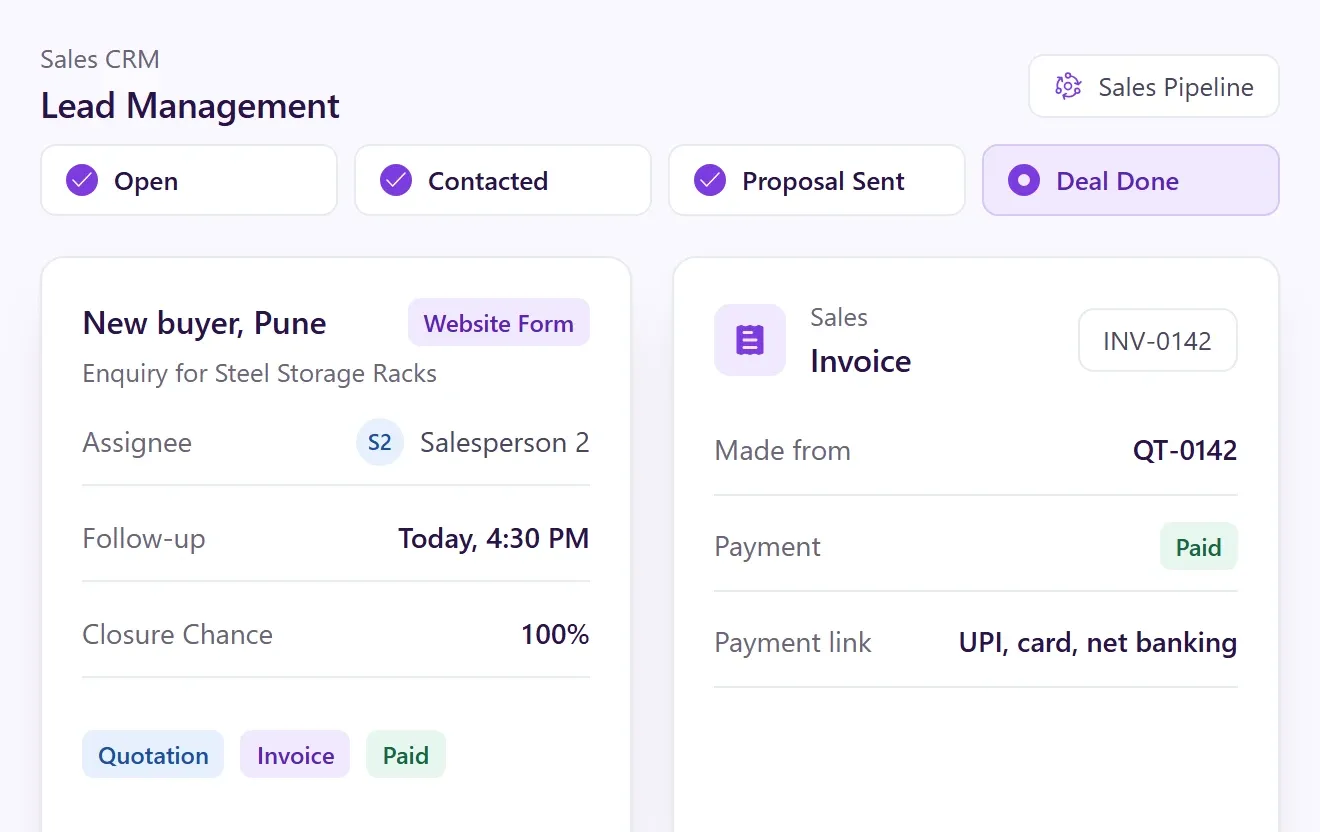
Each enquiry goes to the right salesperson. Once it's won, the quote becomes the invoice on the same lead.
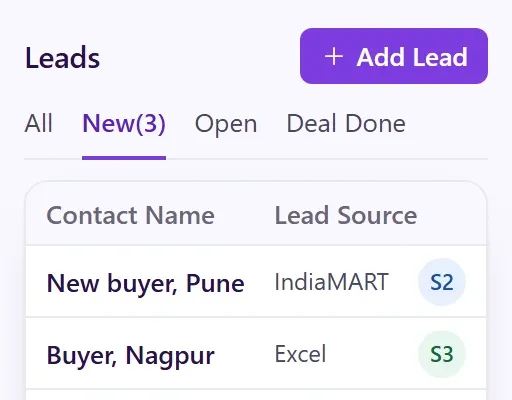
Bring in leads from Excel, IndiaMART, lead forms on your website and other sources, and assign each lead to the right salesperson.
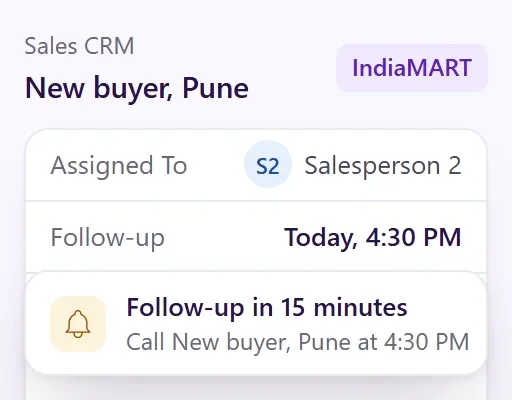
Set follow-ups so your team knows who to contact next and no important lead gets missed.
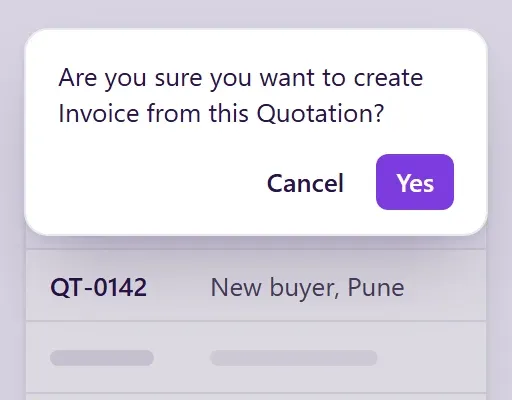
Send a quote to the lead. Once that quote is accepted, turn it into a GST invoice with a payment link without entering the details again.
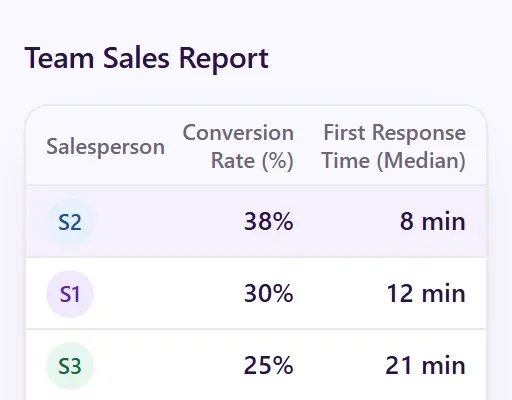
You can track conversion rates, response times and sales performance across your team with Refrens Team Sales Report.
Watch the videos to see how you can add leads, build your sales pipeline, publish lead forms and book meetings.
Most small businesses copy enquiries from forms, chats and marketplaces into a sheet. In Refrens, each one lands with a salesperson.
When a lead comes in, Refrens assigns it by source, product or your own rules. Form leads go to the salespeople you picked for that form.
Website, Facebook, Instagram and marketplace leads come in on their own.
Embed it, open it from a button or link. It takes files and books meetings too.
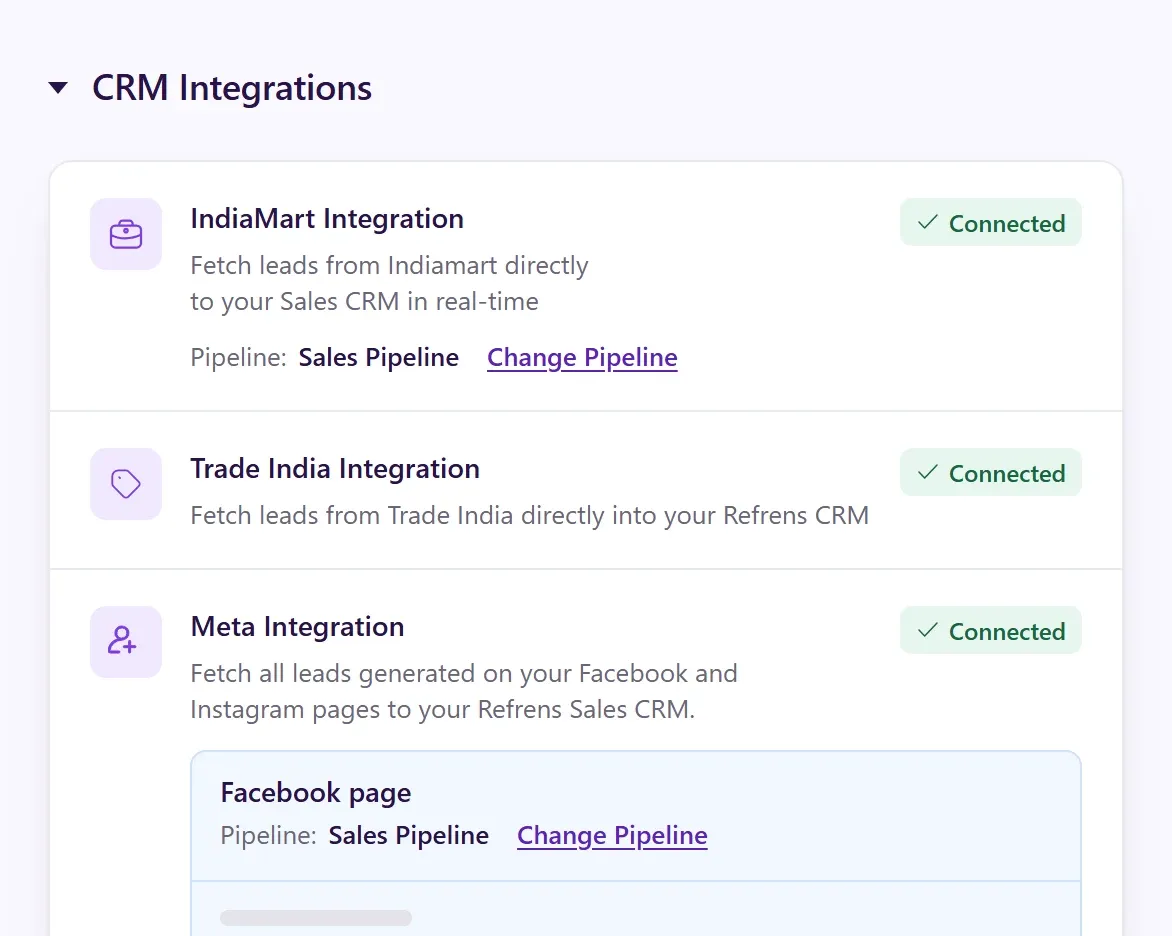
Leads from each page go to the pipeline you set for it.
Enquiries arrive live through the IndiaMART CRM integration, and TradeIndia leads come in too.
Bring old leads in from a CSV file, into the pipeline you choose.
Push leads in from your own systems, or connect other apps through Pabbly Connect.
Most small businesses track deals in a sheet nobody updates. In Refrens, each lead shows its stage and next follow-up.
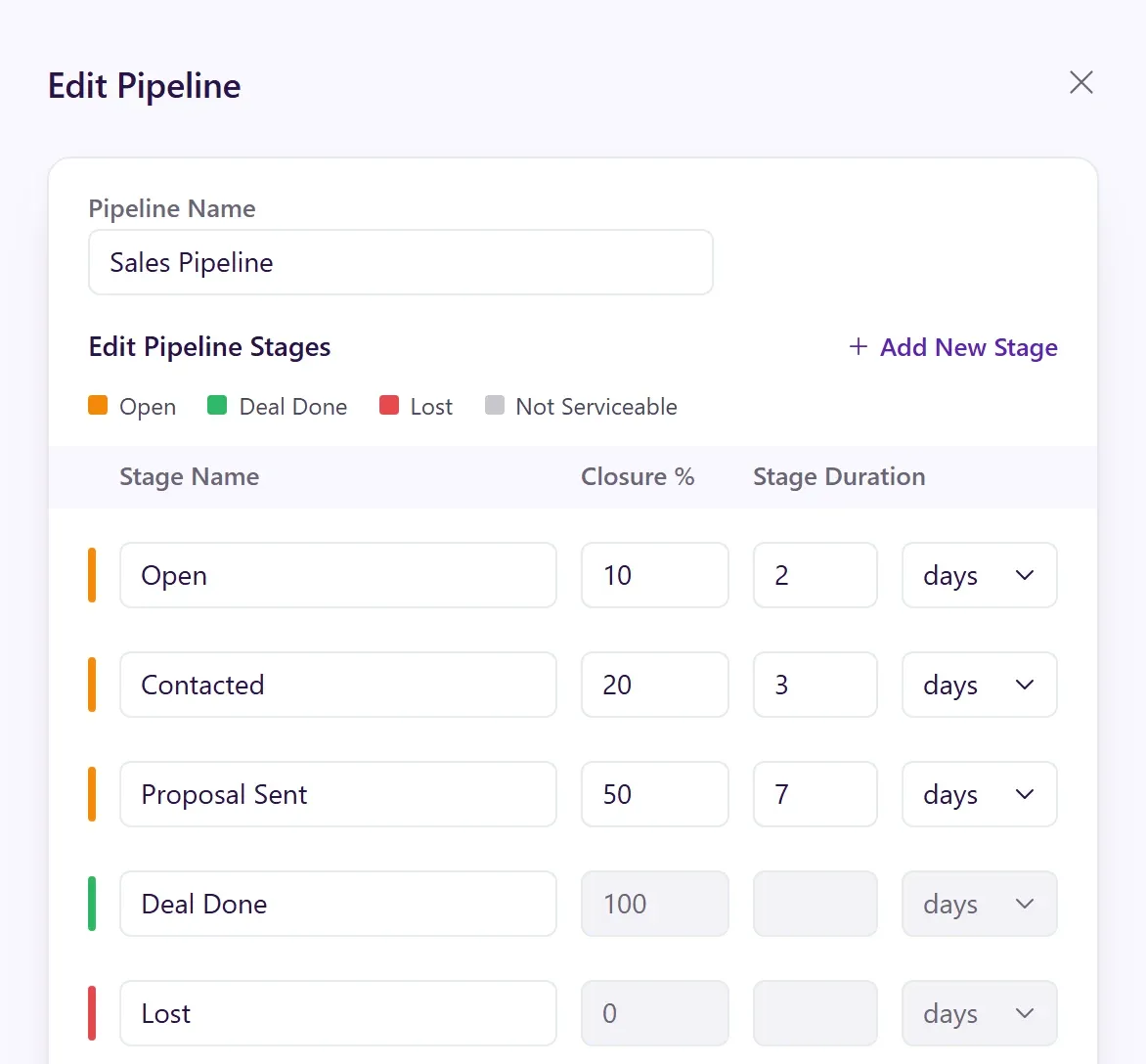
Good sales pipeline management starts with stages that match how you sell. Give each stage a closure chance, and every deal shows its weighted value.
Most teams follow up from personal phones and inboxes. In Refrens, every email and meeting stays on the lead.
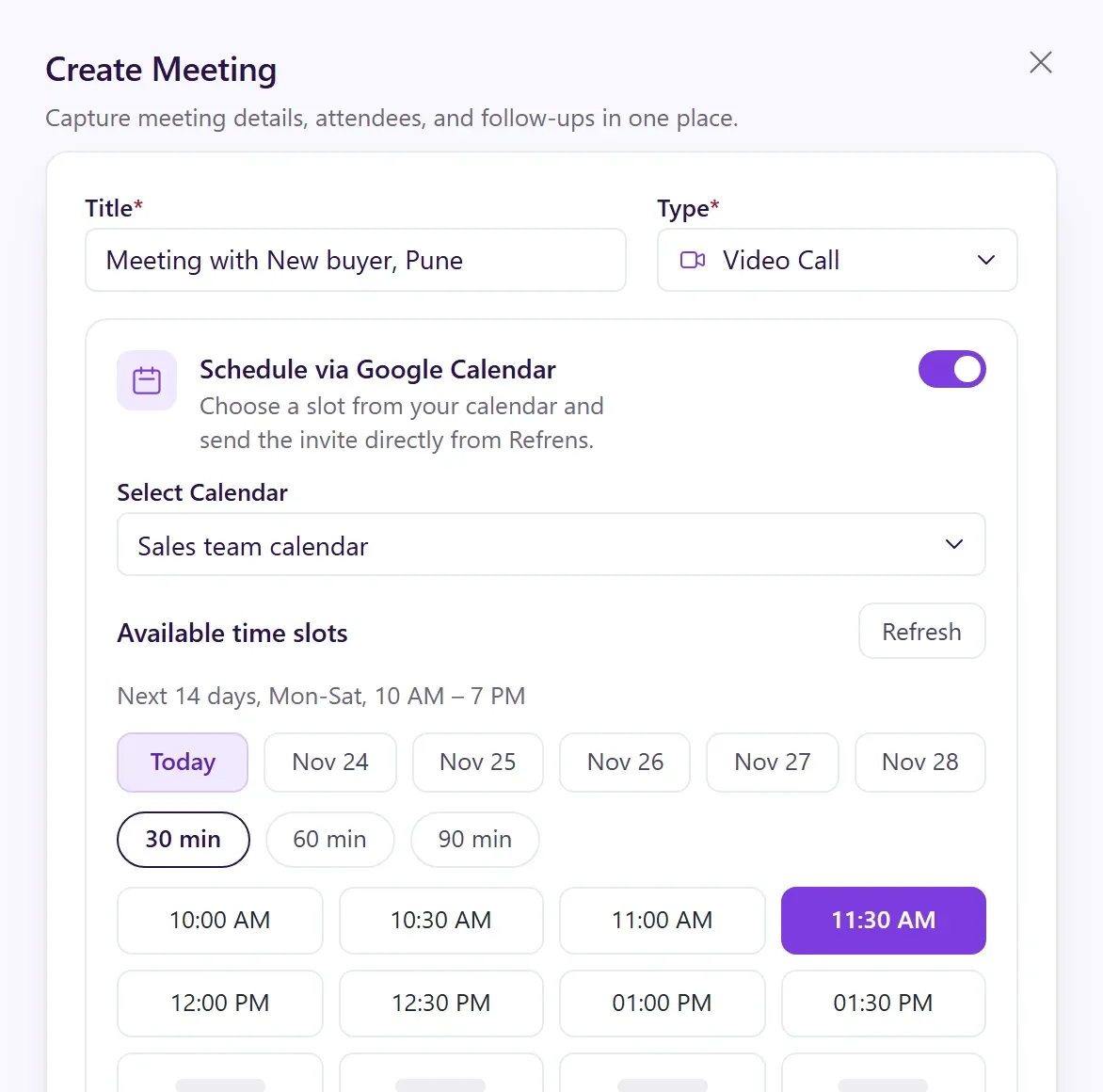
Book phone, video or in-person meetings from the lead with Google Calendar and Meet, or let buyers pick a free slot on your lead form.
Most small businesses retype the quote in a billing app. In Refrens, the accepted quote becomes the GST invoice.
Create the quote from the lead, or the lead from a quote. Expiry reminders go out by email or WhatsApp, and customers accept online.
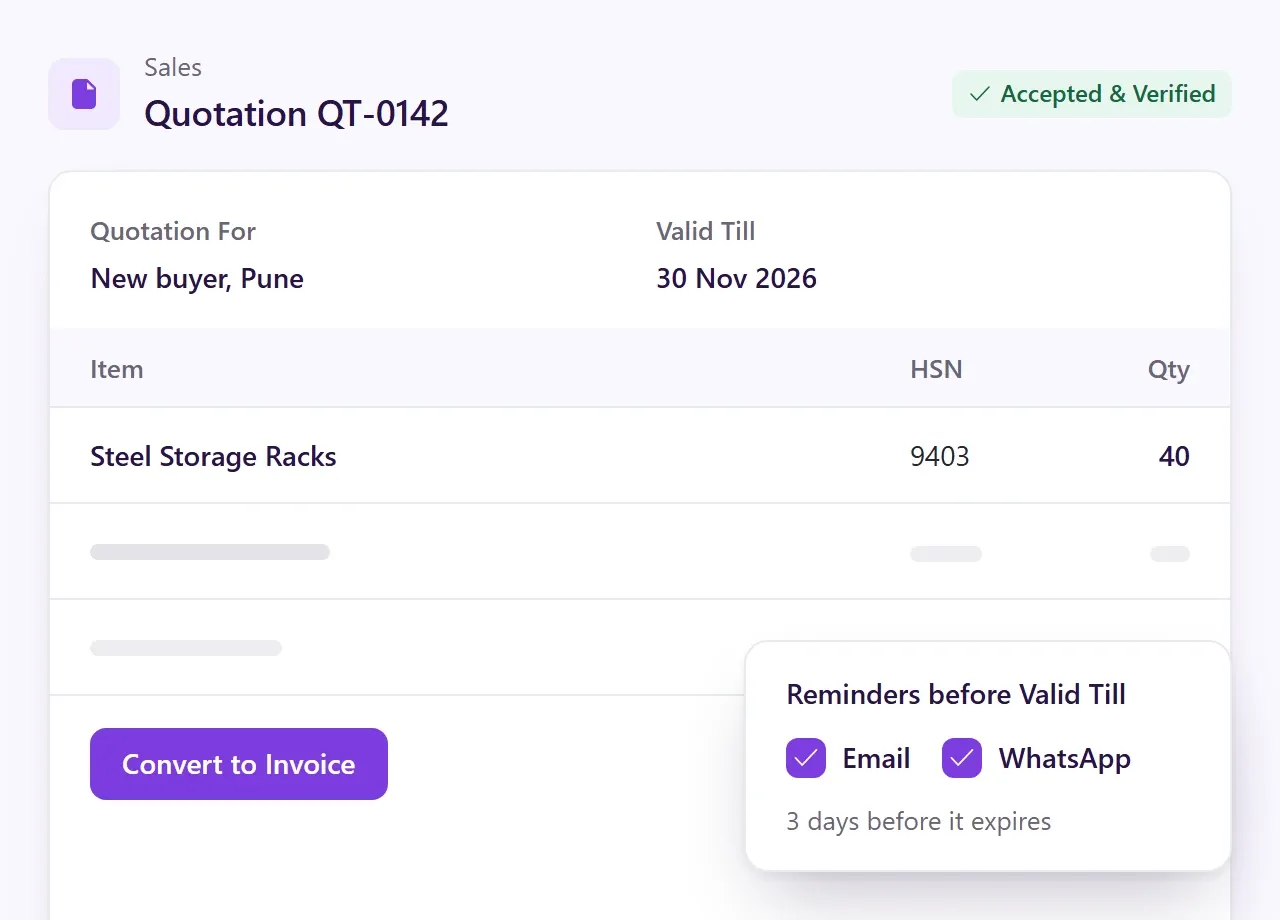
Once a client accepts your quotation, you can convert it into an invoice instead of creating the invoice again from scratch.
Most owners ask the team for numbers every week. In Refrens, three ready-made reports answer those questions.
Compare each salesperson's conversion rate, first response time and closure time.
See revenue and conversion by lead source, so you know which source pays.
See revenue, conversion and retention by customer, so you know who to call back.
Ask Freya, the AI accounting assistant, about your pipeline. Need a report that isn't here? Refrens provides custom reports as per your business needs.
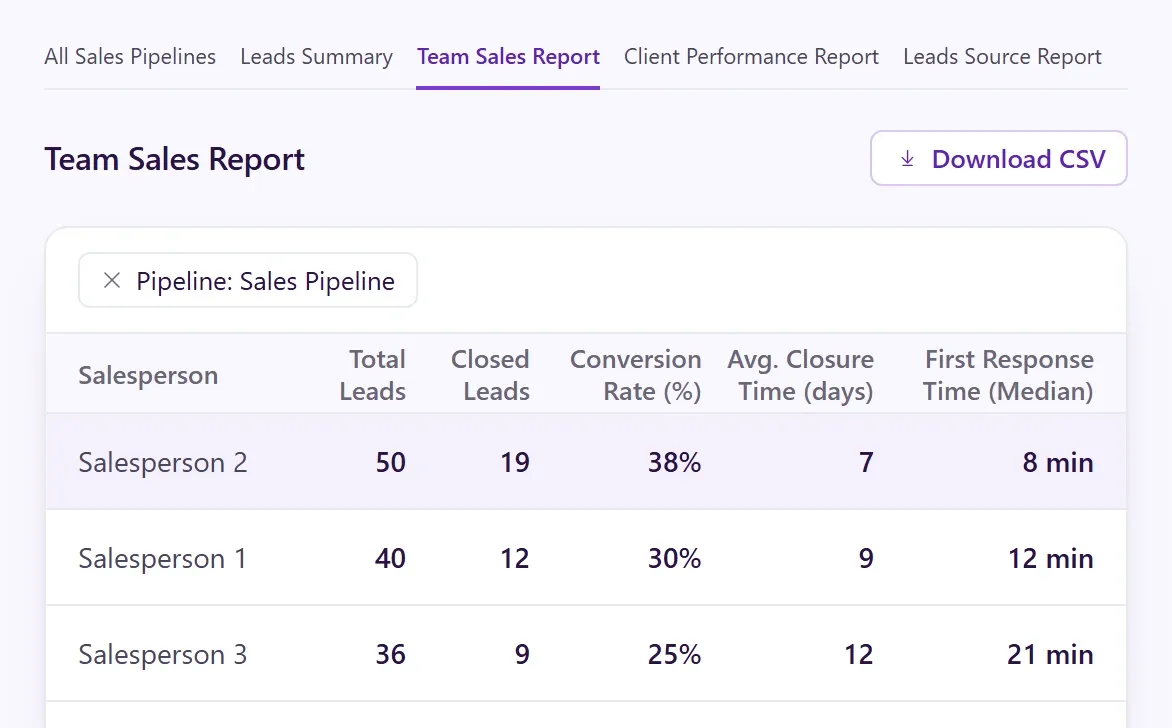
Tell us the fields and columns you want, and the Refrens team builds that report for you.
Connect Refrens once, then ask in plain words. It asks you to confirm before it creates or records anything.
Find the lead from Pune who asked about steel racks
Move the follow-up to tomorrow at 11 and add a note: wants a quote for 20 racks
Done. The follow-up is now tomorrow at 11:00 AM, and the note is on the lead.
Show today's new leads in the Sales Pipeline
Move the Pune lead to Proposal Sent
Moved New buyer, Pune to Proposal Sent.
Confirm
Lead added to the Sales Pipeline at stage Open.
Learn how Refrens MCP connects your account.
Your leads sit next to your quotes, billing, stock and books, so a won deal flows straight through.
Make invoices, share them on WhatsApp or email, and collect payment with a link.
Explore BillingMake GST invoices and e-way bills, and get paid on time.
Explore GST BillingSend quotes your clients can accept online, then turn them into invoices.
Explore QuotationsKeep your books, GST returns and profit ready for your CA.
Explore AccountingCreate GST e-invoices from the same invoice you already made in Refrens.
Explore e-InvoicingTrack each lead from the first enquiry to the quote and the won deal.
Explore Quotes and LeadsSee live stock in every warehouse, updated by every bill and purchase.
Explore InventoryRecord expenses and vendor bills, and approve them before you pay.
Explore ExpensesBefore you pick a CRM, check these six things against how your team sells.
List where your leads come from. In Refrens, website, Facebook and marketplace leads come in on their own.
Check that each salesperson is reminded before a follow-up. Refrens sends an alert 15 minutes ahead.
Refrens is quote software with lead management, so a won quote becomes the GST invoice in one click.
Ask if you can limit each salesperson to their own leads. In Refrens, you set it by role.
Look for reports by salesperson, lead source and customer. Refrens has all three, plus custom reports.
Your team should update leads from a phone. Refrens runs on Android and iOS, and our team helps you set up.
Three businesses show how they run quotation approvals and billing in Refrens.

The machinery maker runs a two-level Quotation Approval across its branches, so every Quote is checked before it reaches the customer.
Read the DOIT Industries Story
The robotics company gets every Quote checked for technical fit and margin before its sales team shares it with the client.
Read the Suprak Technologies Story
The IT company moved Approvals, Billing and revenue tracking across countries and entities out of email and spreadsheets into Refrens.
Read the C5i StoryBusinesses rate Refrens 4.8 out of 5 across more than 17,000 reviews.
Quotation, billing, inventory, and CRM , everything is in one software. No need to juggle multiple tools anymore.
I like how quickly I can create professional quotations and invoices, manage clients, and track payments in one place.

Every sales team is set up differently, so we quote for yours. Your price depends on three things.
Tell us about your team, and get a quote to forward to your partner or CA.
Prefer to try first? Start for free
Still deciding? We'll walk you through it with your own leads.
Book a demoA sales CRM keeps every enquiry, follow-up and quote in one place. In Refrens, leads reach the right salesperson and won quotes become GST invoices. For small businesses and MSMEs, reports also cover sales management.
Not if you sell alone with a few enquiries a week. Once a second salesperson joins or leads come from several sources, a sales CRM gives each lead an owner and a reminder.
Test it with your own enquiries, not a feature list. Connect your main lead source, like your website form, and follow one real lead to a GST invoice. The Refrens free trial needs no card.
Yes. Upload your Excel leads as a CSV file into any pipeline, with each lead's stage, follow-up date and salesperson. An error report shows any row to fix, and the Refrens team can help.
Yes, once you connect them. Website form, Facebook and Instagram leads land in the pipeline you pick, assigned by your rules. IndiaMART and TradeIndia enquiries arrive in real time too.
Yes. When the customer accepts the quotation online, it shows as Accepted & Verified. One click converts it into a GST invoice, in full or in part, with a payment link.
Lead management software covers capturing and qualifying enquiries, while a sales CRM carries on through follow-ups, quotes and the closed deal. Refrens does both, and the won quote becomes the GST invoice.
Yes. Connect your WhatsApp Business number through AiSensy, then send a personalised, approved template to up to 100 selected leads at once. Preview who gets it first. Message charges go on your own AiSensy account.
You decide what each person can see and do. A salesperson can see only their own leads, while you see the whole pipeline. Every lead keeps its activity history, and Refrens is ISO/IEC 27001:2022 certified.
Yes. The Refrens team helps you set up your pipelines, bring in your Excel leads and connect sources like IndiaMART. You also get support by chat, phone or WhatsApp, and a dedicated account manager.
Yes. The full sales CRM works on the Refrens app for Android and iOS. Salespeople can update a lead right after a meeting, and you see the same pipeline on your laptop.
Yes. Start a free trial of the full product, sales CRM included, without a card. The price depends on how many people need a login, and the quote form here gives you a figure.
In a demo, we see how you follow up today, then set Refrens up with your own leads.
Free trial, no card needed
Sales CRM is software that helps businesses create and manage business leads and maintain a healthy relationship between the present customer and prospects in a sales process. It allows you to store all the prospects' information so that sales reps can easily decide which prospects to target. Sales CRM software helps in the process of lead nurturing.
A sales CRM helps create and manage the leads, set up follow-up time, reminder, lead assignee, source of the lead, and lead stages, thus helping sales reps mainly focus on building relationships with prospects rather than data entry.
A point of contact can be anything from the leads to sales between prospects and sales reps, and sales CRM simplifies the process and automates the manual work of data entries.
Sales CRM software automates your administration and data work, thus helping you to save time on data entry work. Sales CRM helps you at every stage, right from the prospect discovering your product or service and generating leads to closing them as a deal. Using Sales CRM, you get to know more about your prospects at each follow-up stage, giving you an upper hand in having a personalized conversation at each passing stage.
As the name suggests, sales CRM helps simplify your business sales process. Now whether it's a small business or a large enterprise, every business has to manage its customer data so that it can serve its customers in a better way. And for any business, retention is the key to successful growth. Sales CRM helps you know your customers' past interactions and purchase details, thus changing the pitch and conversation during communication.
Here are some more reasons why you should use sales CRM software.
Centralized Customer Data - Sales CRM software helps you to maintain centralized data of your past and future customers. It becomes easy to access all the data and purchase details at every pipeline stage. It helps the sales reps to know more about the customer's purchase style, preferences, and specific requirements.
In Sales CRM software, for example, even if one of your sales reps leaves, the data will still be there so that the manager can easily assign that salesperson's lead to a new executive. Also, the new executive will be able to check all the information about the customer's past transactions and communication details, helping him to tailor the pitch during a sales call and increasing his chances of closing the sale.
Improved Lead Management - A sales CRM helps you to track all the leads right from the open stage till closing the deal, thus helping you to manage the leads effectively. You can easily capture the leads with lead forms from your website, email enquires, etc., to the sales CRM software, then assign and distribute the leads to the sales team. This way, leads are paid attention to.
For example, a B2B software company can capture leads from its website and instantly assign them to the sales team, who can follow up quickly with potential buyers. To know more about sales lead management software click here.
Streamlined Sales Processes - A sales CRM helps streamline the sales process by automating repetitive tasks. It helps in lead qualification, follow-up reminder, lead assignee, etc., which makes the sales process more straightforward and can focus on closing the deals. For example, Based on lead, prospect details, and requirements, sales reps can create quotes directly from the lead section saving time and effort.
Enhanced Communication - A sales CRM always helps the sales team and managers to communicate with each other. CRM stores all the important information of prospects, including purchase transactions, notes, and updates added by the sales team, which helps reduce redundant work, thus improving customer service. For example, a B2B sales team can use a CRM to share important details about ongoing deals, enabling different team members to provide seamless support to the customer at various touchpoints.
Data Analysis and Reporting - A CRM provides valuable insights through data and reporting. It helps you to know the lead conversion rate, customer behavior, sales performance, individual sales team performance, etc. These insights help businesses make informed decisions, refine sales strategies, and identify areas for improvement.
As the name suggests, the sales department mostly uses Sales CRM, but other than the sales team, marketing team, customer support team, and business owners also use sales CRM. Let me explain to you one by one.
Sales Team - Sales team uses Sales CRM to manage and track the leads, update the follow-up reminders, take notes, and close the deals so that every other team member is aware of what is happening in the particular lead, which makes the sales process more efficient.
Marketing Team - marketing team can use CRM for the lead source, campaign performance, lead quality, and customer response. For example, a marketing team can easily track the leads generated from any medium like Ads, email campaigns, or influencer marketing.
Customer Support Team - A sales CRM also solves customer inquiries, tickets, complaints, and requests.
Business Owners - Business owners mostly use sales CRM for revenue forecast, total deals closed, sales performance, and deals closed by each sales rep. It also gives insight into improving the sales team's performance and tracking their sales pipeline.
Maintaining strong customer relationships is paramount to success in the fast-paced business world. However, there may be more effective and efficient approaches than relying on spreadsheets to manage customer relationships. While spreadsheets have their merits in certain contexts, they must catch up regarding the complexities and demands of modern customer relationship management (CRM).
Here are why businesses should never consider using spreadsheets and instead opt for dedicated CRM software solutions.
Limited Functionality and Scalability - There is no doubt that spreadsheet has one of the top functionalities regarding data entry and calculations. But even the spreadsheet must include when managing customer relationships (CRM). It needs to improve in many aspects, such as auto-populating leads to the spreadsheet, lead tracking, and sales forecasting. You can not add the entire note or purchase transaction to the spreadsheet. And if you try to manage all these data in the spreadsheet can lead to inefficiencies, data inconsistencies, and a loss of valuable insights.
It’s the same case with scalability; as the business grows, your client base also expands, making it more difficult for your business to handle all the information in a single spreadsheet. The increased number of entries, even the spreadsheet struggle, can lead to slow performance and an increased likelihood of errors.
Data Integrity and Security Risks - Maintaining precise and secure customer data is pre-eminent for every business. A spreadsheet fails in this same issue as it is prone to human errors because most entries are done manually. Moreover, accidental deletion of any data, cell, or row or a single calculator mistake can break your entire business, directly impacting the integrity of your business data.
It also needs to include one of the most prominent functionalities of control access issues and make it difficult to track changes. Talking about this point also leads to potential breaches and violations of privacy regulations if unauthorized individuals gain access to confidential data.
Dedicated CRM software offers greater functionality, data integrity risks, collaboration challenges, and analytics, making it a better choice for modern businesses than a spreadsheet.
In the fast-paced world of sales, maintaining a strong customer relationship is crucial for success. This is where Sales CRM software (Customer Relationship Management) comes into play. A well-designed CRM system can streamline your sales processes, enhance productivity, and boost revenue.
Let's explore the key features that make Sales CRM software an invaluable tool for sales teams.
1. Contact Management
Precise contact detail is the heart of any sales pipeline as without the information it is impossible for sales reps to reach out to prospects and build relationships. A sales CRM helps businesses solve this exact problem by storing and organizing all the customer information in a centralized database. It includes other important information apart from contact details such as communication and purchase history. With comprehensive contact information, you can reach out to prospects in different ways and can personalize
2. Lead Management
Sales CRM software helps you to capture, manage, and organize the leads throughout the sales pipeline. It becomes easy for a manager to assign the leads to the sales team. Later, sales reps can follow up via email and nurture leads by connecting with the prospects. Sales CRM software thus helps to prioritize leads for maximum conversion and ensures no opportunity slips through the sales pipeline.
3. Opportunity Management
Opportunity management focuses on tracking and managing potential deals. A CRM system allows you to create and monitor sales opportunities, assign probability values, and track their progress. This feature provides valuable insights into your sales pipeline, helping you forecast revenue and allocate resources strategically.
4. Sales Analytics and Reporting
Data-driven decision-making is vital for sales success. Sales CRM software offers robust analytics and reporting capabilities. It can generate detailed reports on various sales metrics, such as revenue, conversion rates, sales activities, and individual performance. You can easily generate reports on how many leads are closed, and which leads are in schedule mode. The lead generated is contacted or remained untouched, not serviceable leads. You can easily filter out the leads that are hot, warm, and cold.
5. Email Communication and Automation
Efficient communication is critical for building and nurturing customer relationships. With Refrens sales CRM you can directly send mail to your prospects from the system itself. Moreover, if you have a contact number then you can directly connect with WhatsApp. Refrens sales CRM provides the feature of WhatsApp functionality. This saves time, ensures consistency, and improves overall communication efficiency.
6. Mobile Accessibility
In today's mobile-centric world, having access to CRM data on the go is crucial for sales professionals. A Sales CRM software with mobile accessibility ensures that sales teams can access customer information, manage leads, and update data anytime, anywhere. This flexibility enhances productivity, enables prompt customer responses, and allows for seamless collaboration within the sales team.
7. Create Quotations and Invoice
Once the deal is closed, it’s a good practice to send the quotation to the client so that the process of sales becomes much more efficient. In Refrens sales CRM software, you can directly create an invoice or quotation once the deal is closed with just one click and no need of entering the details of the customer again.
Refrens sales CRM is not just limited to invoice, you can also create quotation, generate GST bill and moreover you have access to proforma invoice template, purchase order template, quotation template, freelance invoice template.
8. Custom Forms
Not just lead management, Refrens also provides the functionality to create custom forms to generate quality leads. With Refrens forms, all the leads are directly populated in sales CRM so you don’t have to upload the details on CRM explicitly. Once the form is created you get a shareable link and shareable code to use it as per your requirement.
Ultimately, CRM software empowers sales teams to manage customer relationships effectively, increase productivity, and drive revenue growth by providing a wide range of essential features. Businesses can gain valuable insights through these key features, optimize their sales processes, and build stronger, long-term relationships with customers. Take your sales to new heights with a Refrens robust CRM solution!
Are you in search of the perfect Sales CRM software for your business?
With numerous options available in the market, finding the ideal solution can be a daunting task. However, by considering specific factors and aligning them with your requirements, you can make an informed decision that propels your sales team to new heights.
This section will explore the key considerations to help you choose the best Sales CRM software.
Mapping Software Capabilities to Your Requirements
To begin your search for the right Sales CRM software, it's crucial to understand your business requirements. Consider the features and functionalities you need, such as contact management, lead tracking, opportunity management, reporting, custom forms, and more. By mapping these requirements to the software's capabilities, you ensure a fit that aligns with your unique business processes.
Pricing
Pricing is a crucial factor when selecting Sales CRM software. Evaluate the cost structure, including subscription fees, implementation charges, and any additional costs for customization. Consider your budgetary constraints and weigh them against the value and ROI the software provides. Remember, the most expensive option is only sometimes the best fit, so prioritize the features and functionalities that matter most to your business.
Usability
A user-friendly Sales CRM software is essential for your sales team's smooth adoption and productivity. Look for intuitive interfaces, streamlined workflows, and easy navigation. Consider whether the software offers customization options to tailor the user experience to your team's needs. A solution that is easy to learn and use will increase user adoption and minimize training time.
Flexibility
Flexibility is crucial when choosing a Sales CRM software that can adapt to your evolving business needs. Evaluate the software's scalability, integrations with other tools and systems, and ability to accommodate future growth. A flexible solution will allow you to customize fields, workflows, and reports to match your unique sales processes, ensuring a seamless fit with your organization.
Customization
Every business has unique sales processes and requirements. Therefore, selecting a Sales CRM software that offers customization options is vital. Consider whether the software allows you to create custom fields, workflows, and reports tailored to your needs. Customization empowers you to capture and analyze data in a way that aligns with your sales strategies, providing actionable insights.
Security and Compliance
Protecting your customer and company data is paramount. When evaluating Sales CRM software, prioritize security features such as data encryption, access controls, and regular data backups. A secure and compliant CRM solution instills customer confidence and safeguards sensitive information.
Mobility
In today's mobile-centric world, having Sales CRM software that offers mobile access is essential. Consider whether the software provides mobile apps or a responsive web interface that allows your sales team to access crucial information on the go. Mobility enables real-time updates, enhances productivity, and empowers your team to close deals from anywhere.
User Adoption and Training
Smooth user adoption is key to maximizing the benefits of your Sales CRM software. Look for solutions that provide comprehensive user training, documentation, and ongoing support. A vendor that offers resources, tutorials, and responsive customer support ensures your team can quickly adapt to the new software and leverage its full potential.
Customer Support
Reliable customer support is essential when selecting a Sales CRM software. Evaluate the vendor's support offerings, such as email, phone, or live chat, and their response times. Read customer reviews and testimonials to gauge the vendor's reputation for addressing customer concerns promptly and effectively. A responsive support team can save you time and help resolve any issues that may arise.
Choosing the right Sales CRM software is a critical decision that can significantly impact your sales team's productivity and success. You can make an informed choice by carefully considering your requirements, mapping software capabilities, and evaluating pricing, usability, flexibility, customization options, security, mobility, user adoption, and customer support. Remember, each business has unique needs, so prioritize the factors that align with your specific sales processes. Selecting the right Sales CRM software sets the stage for streamlined operations, improved customer relationships, and accelerated sales growth.